
STARTING AUGUST 10th:
Submit & Track Support Tickets in Smart Visibility
Starting Aug. 10, 2026, customer support tickets move from ServiceNow to Smart Visibility. Any tickets currently open in ServiceNow will migrate over automatically.
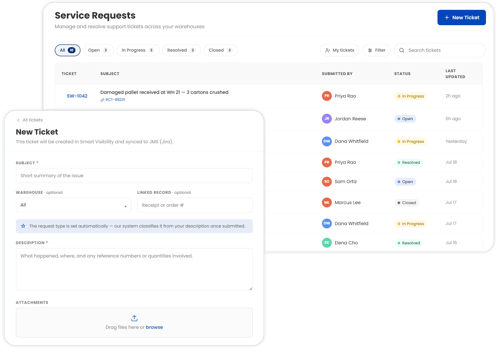
A Better Way to Get Support
- Submit and track tickets without leaving Smart Visibility. See statuses, updates, and context, right where you already work.
- Context stays with the ticket. Attachments, activity history, and the relevant warehouse record are all visible in one place.
- Simplified, automated workflows route tickets to the right team, leading to more efficient resolutions.
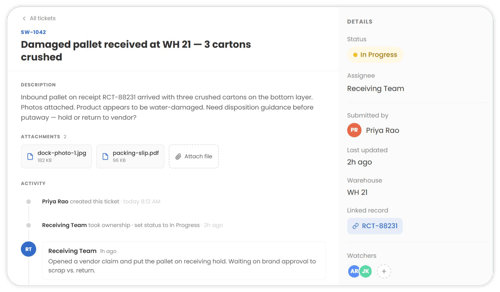
What's New in Smart Visibility
Two things will show up after launch:
- A new Service Requests item in the Smart Visibility quick menu, where you can submit and manage all your support tickets.
- A new alert icon in the main navigation that flags any updates on your open tickets.
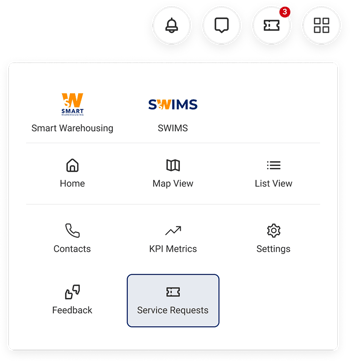
Getting Access
If you're already an active Smart Visibility user, there's nothing you need to do. Service Requests will simply appear in your quick menu on Aug. 10.
If you are a Smart Warehousing customer and haven't activated your Smart Visibility account yet:
- Go to smartvisibility.io and click Login.
- Enter your email address and click Continue.
- Watch your inbox for a link to authenticate and set your password. The email may take a few minutes to arrive, and the link expires after 48 hours. The email will come from no-reply@pangea.cloud, Smart Visibility’s cybersecurity platform.
- Need a quick overview of Smart Visibility? Watch this video.
What's Next
More detailed instructions on submitting and managing tickets in Smart Visibility are coming in the next few days and will also be available directly within Smart Visibility once launched.